
Connect WhatsApp Business numbers with Meta's guided signup or a Helios number, manage templates, and handle conversations in real time.
Objective
Connect WhatsApp Business numbers to your agents through Meta's guided signup, manage message templates, and work every conversation in real time with AI hand-off, insights, and human takeover.
Access
Sidebar -> WhatsApp
Routes:
- List and connections: /app/{tenant}/whatsapp
- Conversation view: /app/{tenant}/whatsapp/{id}
- Notifications: /app/{tenant}/whatsapp/notifications
- Settings: /app/{tenant}/whatsapp/settings (deprecated — redirects to the main page; all configuration is done through modals)
Roles
- Page and conversations: owner, admin, agent (account must be active).
- Connect with WhatsApp (guided Meta signup): owner, admin.
- Edit / delete / activate a number: owner, admin.
- Message Templates: owner/admin only, and only for Meta connections.
- Delete a conversation: owner/admin only.
Prerequisites
- A plan that includes WhatsApp and available number capacity. Without it, the connect action opens an upgrade prompt.
- A verified account email. Connecting, editing, or deleting a connection is blocked until the email is verified.
- An Agent that is active and has the WhatsApp channel enabled. Every WhatsApp responder picker offers only those agents, and Edit refuses to save a connection marked Active with no agent assigned.
- A phone number: your own business number, or a Helios number rented in Phone Numbers.
- A Meta (Facebook) login to complete the guided signup window.
WhatsApp connection is being rolled out gradually. If the connect button reports it is not available for your account, ask an owner/admin or contact support.
Overview chips
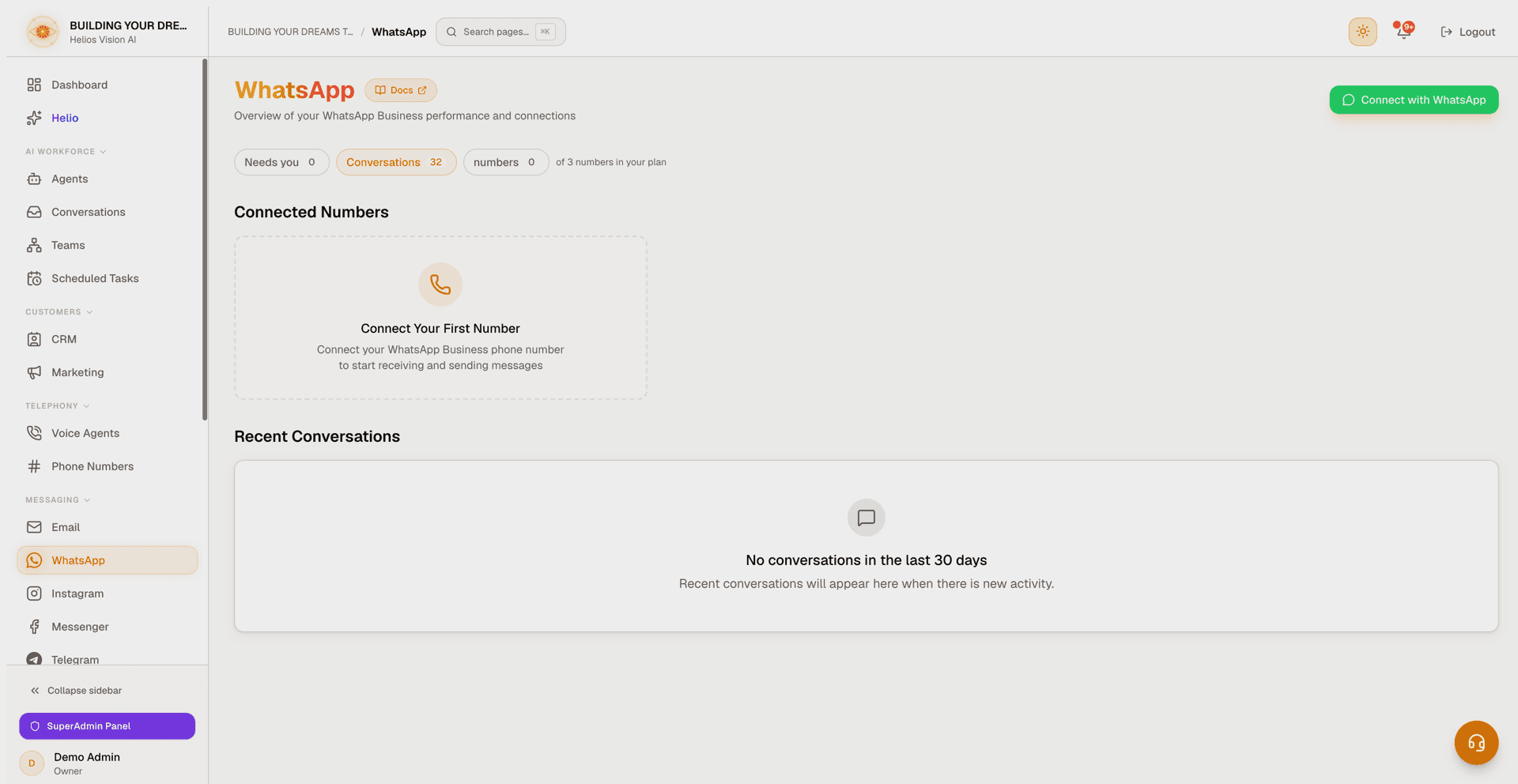
A row of stat chips sits at the top of the page (shown when your plan includes WhatsApp):
| Chip | Shows | Action |
|---|---|---|
| Needs you | WhatsApp conversations that require human attention | Opens Conversations filtered to WhatsApp with the attention filter on |
| Conversations | Total WhatsApp conversations | Opens Conversations filtered to WhatsApp |
| numbers | Active numbers in use; turns amber when you reach your plan's ceiling | Static chip |
The row ends with your plan's ceiling in words — "of 3 numbers in your plan", or "unlimited in your plan".
If the counts cannot be loaded, the chips are hidden rather than showing zeros.
Connect a number
Meta's guided signup (a Meta popup) is the only way to connect a number — there is no manual credentials form. Three entry points open the same flow:
- Connect with WhatsApp — the green header button.
- Connect Your First Number — the empty-state card, when nothing is connected yet.
- Connect New Number — the row under Connected Numbers.
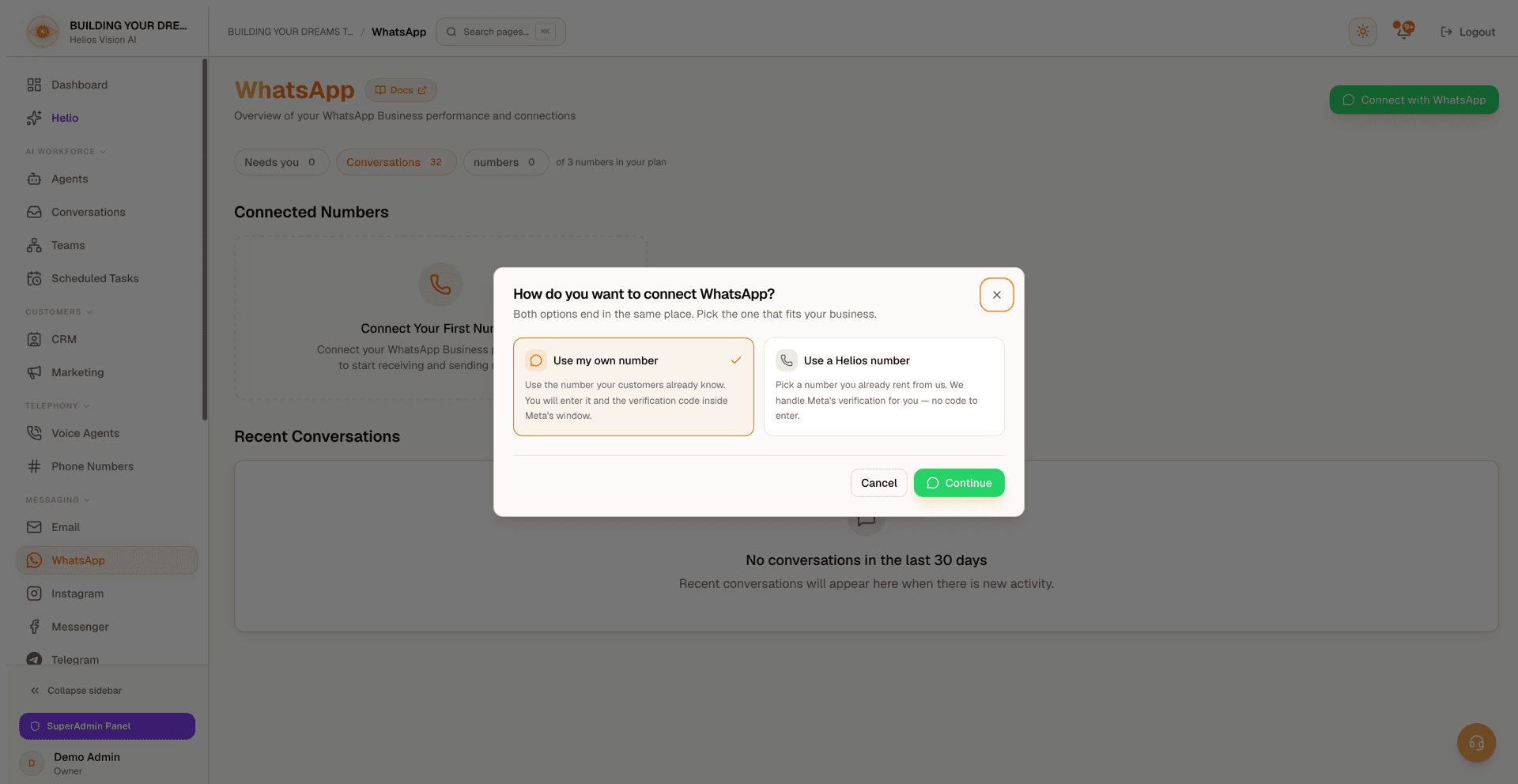
A dialog first asks How do you want to connect WhatsApp? Both options end in the same place:
| Option | What happens |
|---|---|
| Use my own number | Use the number your customers already know. You enter it, and Meta's verification code, inside Meta's window. |
| Use a Helios number | Pick a number you already rent from Helios. Helios handles Meta's verification for you — no code to enter. The number keeps working for calls at the same time. |
If you have no Helios number yet, the second option is disabled ("You do not have a Helios number yet. Buy one first, then connect it to WhatsApp.") — see Phone Numbers. Press Continue to launch the Meta window.
Use my own number
- A Meta popup opens. Sign in with Facebook and link (or create) your WhatsApp Business Account.
- Enter your phone number and the verification code inside Meta's window.
- When the popup finishes, the connection appears under Connected Numbers. There are no tokens or webhooks to copy.
A number that is already active on another WhatsApp account (including the consumer WhatsApp app) cannot be onboarded — release it there first.
Use a Helios number
Choose the number in the dialog and press Continue. The Meta popup only links your WhatsApp Business Account; you never type the number or read a verification code — Helios adds the number and completes Meta's verification automatically.
A progress card appears above Connected Numbers and follows the setup live:
- Account linked. Adding your number.
- Number added. Asking Meta for the verification code.
- Waiting for Meta's verification code.
- Code received. Verifying with Meta.
- Verified. Registering the number.
- Registered. Finishing up.
- Your number is connected to WhatsApp. — the card also reminds you that the payment method in Meta is still yours to add; press Done to dismiss it.
If a step fails, the card explains why and offers Start over:
| Failure | What it means |
|---|---|
| Meta's verification code never arrived | The carrier did not deliver Meta's SMS. Try again, or connect a number you already own. |
| Meta would not add this number | Check that the number is not already in use on another WhatsApp account. |
| Meta rejected the verification code | Start over to request a fresh code. |
| Meta would not register this number | Contact support with the number. |
If the page loses track of the setup, or stops waiting before Meta answers, it says so and keeps running on Helios' side — the number appears in the Connected Numbers list once it is ready, and Start over is there if you would rather retry.
After connecting
- New connections start Inactive and unassigned. Open Edit on the row, pick an agent, tick Active (enable this connection) and save — or save the agent first and flip the row's switch.
- Add a payment method in Meta. Registered is not the same as able to send: Meta requires a payment method on your WhatsApp Business Account before any message can go out, and only you can add it, in Meta's own interface. Until then the row wears a Payment unverified (or Cannot send) badge, and the detail strip under the row lists the three steps, an Open Meta billing shortcut and an I have added it button. The page-wide banner ("One step left: add your payment method in Meta") names only numbers that are switched on, so a number you just connected shows the badge before it ever shows the banner. After pressing I have added it the warning softens, and it clears completely once a message actually goes out.
Connected numbers
Each connection appears as a row with a status dot, the display name and, as a subtitle, the Phone Number ID (Meta) or the phone number (legacy Twilio rows). On each row you can:
- Toggle Active / Inactive with the switch.
- Open the menu for Edit or Delete (delete requires confirmation; deleting an active number shows a warning).
- Read the detail strip underneath: the Business ID (Meta), the assigned agent, any warning, and the payment guidance. It is always visible — nothing is hidden behind an expand control.
Badges that may appear on a row:
| Badge | Meaning |
|---|---|
meta provider / twilio provider | Whether the number runs on Meta or Twilio (legacy). |
| Needs attention | The provider no longer accepts this account's credentials. Click it to open the edit modal and reconnect. |
| Cannot send / Payment unverified | Billing readiness of the WhatsApp Business Account. Click it to open Meta billing. Shown alongside the health badge, never instead of it. |
| Linked agent inactive | The assigned agent is inactive. Click it to pick an active replacement. |
| Solo / Team (N) | Responder mode for the assigned agent, with the approved specialist count for Team. |
Notes:
- When more than one number is connected, a search box and sort control (Name A–Z, Name Z–A, Active first) appear.
- Turning a number on while its linked agent is inactive opens a dialog to choose an active agent before activating; you can also set Solo or Team there.
- A number with no agent at all can still be switched on. Nothing answers it, and the detail strip says Assign an agent to enable messaging.
- If you are already at your plan's number limit, activating or connecting a number opens the upgrade prompt instead.
Edit a connection
Owner/admin only. The edit modal manages an existing Meta Cloud API connection:
| Field | Required | Notes |
|---|---|---|
| Display Name | Yes | Up to 50 characters. |
| Assigned Agent | Yes when Active | Only agents that are active and have the WhatsApp channel enabled are offered. See "Who answers" below. |
| Webhook URL | Read-only | Copy button available. |
| Webhook Verify Token | Auto-generated | Use Regenerate to create a new one. |
| Phone Number ID | Yes | From Meta Business. |
| Business Account ID | No | Your WhatsApp Business Account (WABA) ID. |
| Access Token | Yes | Stored securely and shown as Saved; use Replace to enter a new one. |
| App Secret | Recommended | Used to verify webhook signatures. Also shown as Saved once stored. |
| Active | No | Enable this connection. If set on, an assigned agent is required to save. |
| Phone Access Control | No | See below. |
Use Test Connection to validate the Phone Number ID and token (stored or newly entered). On success it shows the verified display name (and quality rating when available) and clears a stale Needs attention flag.
Legacy Twilio connections can no longer be edited — the modal shows a notice instead. Activate/deactivate and delete still work from the list.
Who answers
Assigned Agent is a single dropdown that starts on No Agent Assigned and groups its options:
- Agents (answer alone) — every agent that is active and declares the WhatsApp channel. The chosen agent answers this number by itself.
- Teams (can ask a specialist for help) — only appears when your plan includes Teams and at least one of those agents coordinates approved specialists. Entries read Team: name (N specialists), and once you pick one, a line under the dropdown names the team, its approved specialist count, and links to Manage.
Two warnings can appear under the dropdown:
- "No agents have the WhatsApp channel enabled. Enable it in agent settings first." — nothing qualifies yet; enable the channel on an agent and come back.
- When the agent previously linked to this number is now inactive, or no longer declares WhatsApp, the dropdown resets to No Agent Assigned and says so by name. Pick a replacement before saving, so the change is one you chose.
Phone Access Control
Available when editing a connection. It controls which numbers the AI answers:
| Mode | Behavior |
|---|---|
| No restrictions | The AI responds to everyone. |
| Whitelist | Only listed numbers get AI responses; other messages are silently ignored. |
| Blacklist | Listed numbers are blocked and not saved; everyone else gets AI responses. |
| Bypass AI | Listed numbers are saved but not auto-replied; you respond manually. Everyone else gets AI responses. |
You can add numbers one at a time (with an optional label) or bulk-import one per line, optionally as number,label.
Message Templates
Visible to owner/admin, and only for Meta connections whose credentials are stored. Templates are pre-approved messages used to start conversations outside WhatsApp's 24-hour customer-service window. They are managed on the WhatsApp Business Account, so multiple numbers on the same account share one list (a source dropdown appears when there is more than one).
The section header shows how many templates the account has and a Refresh action. The table lists Name, Status, Category, Language, Body, and a delete action. Statuses include Approved, Pending review, Rejected, Paused, Disabled, In appeal, Pending deletion, and Limit exceeded. A rejected template shows Meta's reason under its status.
Create a template with the Create template button:
| Field | Required | Notes |
|---|---|---|
| Name | Yes | Lowercase letters, numbers, and underscores only. |
| Language | Yes | One of: en_US, en_GB, es, es_ES, es_MX, pt_BR, fr, de, it. |
| Category | Yes | Utility (order updates, reminders, transactional) or Marketing (promotions and announcements; stricter review). |
| Header | No | Up to 60 characters. |
| Body | Yes | Up to 1,024 characters. Use placeholders like \{\{1\}\}, \{\{2\}\} for variables. |
| Examples | When variables are used | One example value per placeholder. |
| Footer | No | Up to 60 characters. |
A live preview renders as you type. After submission the template appears as Pending until WhatsApp approves it.
Deleting asks for confirmation first: it removes the template in all its languages, and if the template was approved its name cannot be reused for 30 days. Messages already sent are not affected.
Sentiment overview
When conversations have been analyzed, a panel breaks down Positive, Neutral, and Negative counts across recent conversations.
Recent conversations
A table (cards on mobile) of the 40 most recently updated conversations from the last 30 days, most recent first, excluding archived. Columns: Contact, Status, Last Message, AI Insights, and an Action to open the chat. On mobile the list loads ten at a time behind Show More.
- Status badges: Active, Closed, Pending.
- A Needs Attention badge marks conversations that require a human or were escalated by the AI.
- Sentiment is shown when it has been analyzed.
- A reply the outbound policy held for review never becomes the Last Message preview — the customer never received it.
Conversation view
Route: /app/{tenant}/whatsapp/{id}
The header shows the contact, the from/to numbers, the channel, the account, and when the conversation started. A Team-assisted badge appears when specialists contributed.
State banners:
- AI Requested Assistance — the AI asked for help, with the reason when it gave one. Use Take Over to handle it as a human.
- Human Agent Active — a human is handling it and AI responses are paused. Use Return to AI to release it back.
Controls:
| Control | Effect |
|---|---|
| Status badge | Active, Closed, or Archived. |
| Close | Closes an active conversation (asks for confirmation). |
| Reopen | Reopens a closed or archived conversation. |
| Archive | Archives a closed conversation (asks for confirmation). |
| Delete | Owner/admin only. Permanently removes the conversation (with confirmation). |
| AI Active / AI Disabled | Toggle whether the AI auto-replies. When disabled, the conversation is handled by humans only. |
Messaging:
- Send text with the composer (Enter sends, Shift+Enter adds a newline). Your message appears immediately while it is being sent.
- Messages render text, images, video, and the attachments your customers send: voice notes play in place, documents open in a new tab. An attachment whose file is no longer stored shows Attachment no longer available instead of a broken preview.
- Outbound delivery status shows as sent (✓), delivered (✓✓), read (blue ✓✓), or failed (✗).
- A Held for review chip marks a reply the outbound policy stopped before sending — the customer has not received it, and it needs a person's decision. If the 24-hour reply window has since closed, the chip reads Held: reply window closed and only an approved template can reach that customer.
- The view picks up new messages on its own every few seconds.
AI Insights (sidebar on desktop, sheet on mobile):
- Sentiment Analysis and Conversation Summary.
- Generate Insights (or the refresh action) analyzes the conversation. This uses your AI key; if a key is missing or invalid the toast links you to the API keys settings.
Notifications
Route: /app/{tenant}/whatsapp/notifications
Lists escalation alerts, new-message notices, and takeover requests. You can:
- Mark as read an individual notification, or Mark all as read.
- Open View Conversation to jump into the chat.
Good practices
- Right after connecting, assign an active agent (with the WhatsApp channel enabled) and switch the number to Active — new connections start Inactive on purpose, and a number switched on without an agent receives messages that nothing answers.
- Add your payment method in Meta immediately after connecting; the number cannot send anything without it.
- If a number shows Needs attention, open Edit to refresh its credentials — or run Connect with WhatsApp again with the same number, which reconnects it without losing its agent or active state.
- Use templates to start conversations outside the 24-hour window; keep names lowercase with underscores, and remember an approved name is locked for 30 days after you delete it.
- Turning off AI hands the conversation to humans only — reply manually or return it to the AI when done.
Common errors
- "WhatsApp connection isn't available for your account right now" — role or rollout gate. Ask an owner/admin, or contact support.
- "Your current plan does not include WhatsApp" — upgrade your plan or add the WhatsApp add-on.
- "You've reached your plan's WhatsApp number limit" — upgrade, or deactivate another number first.
- "That WhatsApp number is already connected to another account" — the number is in use elsewhere in Helios.
- "This number already has a WhatsApp setup in progress" — wait for it to finish or try again in a few minutes.
- "That number is not one of your active Helios numbers" — buy or activate it in Phone Numbers first.
- "Connection cancelled" / "No WhatsApp number was selected" — the Meta window was closed early; try again and finish every step.
- "Active WhatsApp numbers must have an assigned agent" — you ticked Active in the edit modal without choosing an agent.
- The row's switch will not turn a number on: its linked agent is inactive, so the swap dialog opens instead — pick an active agent there.
- Number is connected but nothing sends: add the payment method in Meta (see the row's payment badge and the steps under it).
Related
Inbox (Email)
Connect Outlook or Gmail, let AI draft and send replies with human review, and work your mail as conversations with health and performance insight.
Connect WhatsApp with Meta
Connect a WhatsApp Business number in minutes with the guided Connect with WhatsApp flow — no Meta developer app, tokens, or webhooks needed.