
Conversations
Supervise every conversation across every channel from one unified inbox: filter, reply, take over from the AI, and see CRM context in one place.
Objective
Conversations is your unified omnichannel cockpit: a single, supervisory work queue of every conversation across all channels, so your agents reply and you supervise from one place.
Channels covered: WhatsApp, Web Chat, Instagram, Messenger, Telegram, Email, and Voice.
TikTok is deliberately not part of this inbox: a TikTok "conversation" is a chain of public comments under your own video, with no private thread to reply into and no takeover. TikTok activity lives in its own module instead.
Access
Sidebar -> Conversations Routes:
- /app/{tenant}/conversations (the cockpit)
- /app/{tenant}/conversations?channel={channel} (filtered by channel)
- /app/{tenant}/conversations?status=closed (or all) (the Open / Closed / All filter)
- /app/{tenant}/conversations?attention=1 (pre-filtered to Needs attention — the dashboard's attention KPI links here)
- /app/{tenant}/conversations?item={id} (a conversation open in the detail panel; resolved server-side, so the link works even for conversations beyond the first page)
- /app/{tenant}/conversations/{id} (Web Chat full conversation view)
All of these filters are mirrored in the URL, so a filtered view survives a reload and can be shared as a link.
The channel modules also lead here: WhatsApp, Web Chat, Instagram, Messenger, and Telegram each show a Needs attention and a Conversations chip at the top of their page, and both open this cockpit already filtered to that channel.
Roles
- owner, admin, agent
Notes:
- Viewer does not see this module.
- Reply, takeover, and Mark as done are re-checked server-side per user. A user whose role cannot act sees the controls hidden and the notice "Your role can read this conversation but not reply."
- Deleting a Web Chat conversation is limited to owner/admin.
- The Email channel only appears when the workspace has the email/inbox module enabled; otherwise the Email chip, rows, and counts are hidden.
Prerequisites
- At least one connected channel (WhatsApp, Web Chat, Instagram, Messenger, Telegram, Email, or Voice).
- An agent is what makes the AI answer, not what makes a conversation appear: an agent must be active and must declare that channel to be offered as its responder. Without one, messages still arrive here and wait for a person — and on Instagram and Messenger an account can answer direct messages with a fixed message instead of an agent, or with nobody at all.
The conversation list
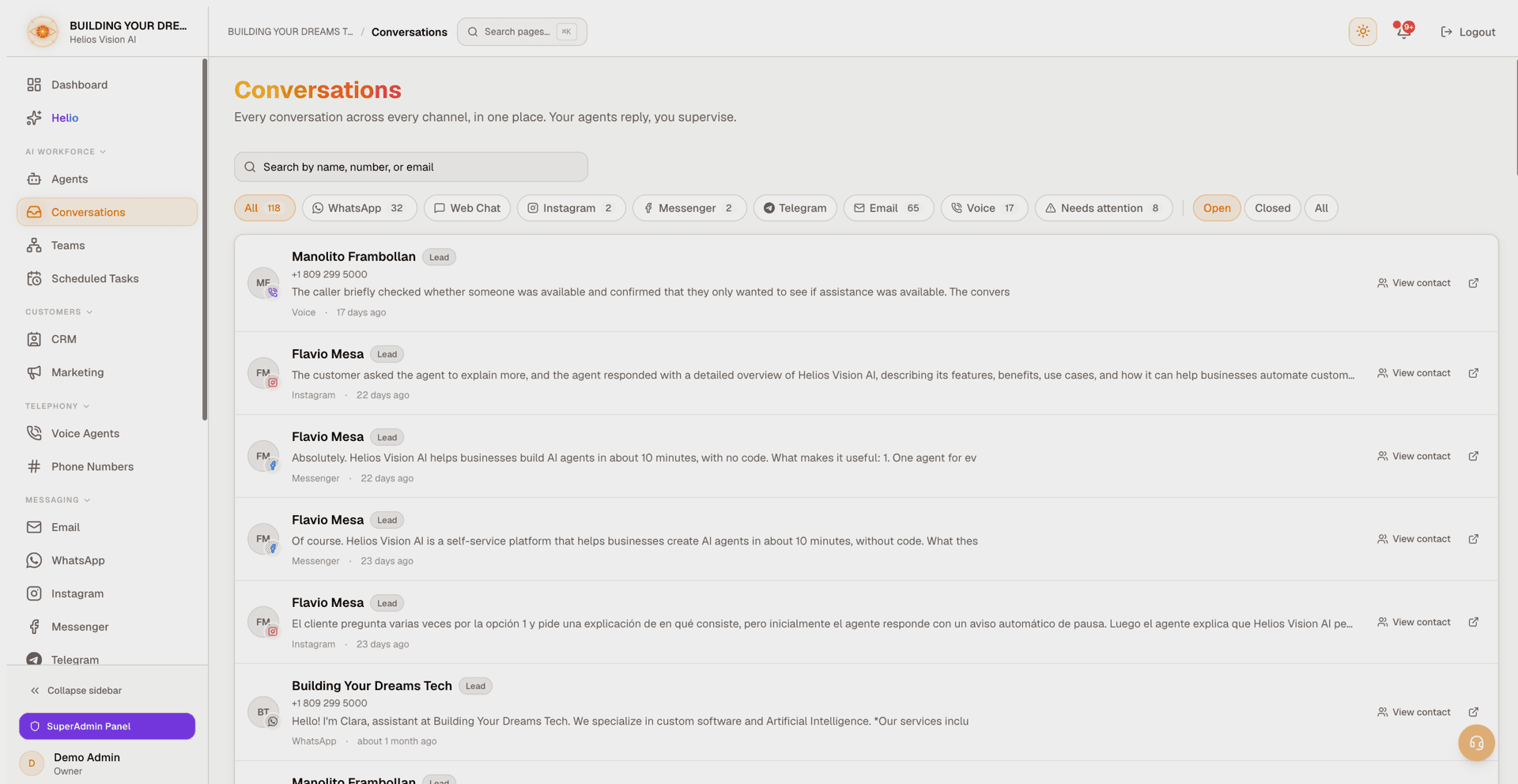
Each row shows:
- A customer avatar: the real profile photo when the platform provides one (Instagram, Messenger, Telegram), otherwise an initials monogram for a real name or a neutral person icon. Photos are fetched fresh through Helios, so they stay current and no platform credentials ever reach the browser.
- A small brand-tinted channel badge pinned to the avatar's corner.
- The customer's display name (smart-resolved, so raw phone prefixes, numeric platform IDs, "Unknown" placeholders, and JSON blobs are never shown — you get the real name, a formatted phone, or an honest "Instagram user" / "Messenger user" / "Unknown contact").
- An identity subtitle (formatted phone or email) when it adds information beyond the name.
- The last-message preview (media shows as a localized label like "Image" or "Voice note").
- The channel name and a relative timestamp.
Status indicators on a row:
- A CRM lifecycle chip (Lead / Active / Customer) when the customer is linked to a contact.
- An AI escalated badge (amber) when the AI asked for a human.
- A Human takeover badge (blue) when a person has seized the conversation.
- A "needs attention" dot on the avatar.
Automated email is filtered out: email threads whose inbound side is entirely machines (no-reply addresses, mailing lists, auto-generated bounces and notifications) do not appear in the cockpit or its counts. This inbox shows correspondence with people; the Email module lists everything and has its own Person/Automated filter.
Search and filters
- Search: the box (Search by name, number, or email) matches the linked contact's name, email, and phone, and the conversation's own customer name and identity. Use the X to clear.
- Channel chips: an All chip plus one chip per channel, each with a live count. The selected channel is reflected in the URL (?channel=).
- Needs attention: filters to conversations flagged for attention or in an AI-escalated / Human-takeover state. It combines with the channel chips and is mirrored to the URL (?attention=1).
- Open / Closed / All: the work-queue state. Open (the default) shows conversations that still need work; Closed shows the ones marked done or archived; All shows both. Channel counts follow the selected state.
Pagination and realtime
- Load more pages the list 50 conversations at a time.
- The cockpit updates live: new messages and new conversations bump the counts and the list without a manual refresh. If a conversation is open in the detail panel, its thread silently refreshes too.
- Once you have used Load more, live events keep updating the counts but stop replacing the list, so a page you scrolled into is never pulled out from under you.
- If a background refresh fails, the list is never wiped: a warning appears ("Showing the last data loaded. The most recent refresh failed.") with a Retry action, and the rows you already had stay on screen.
Row actions (desktop)
- View contact: opens the linked CRM contact (shown only when the conversation is already linked to one).
- Open full view: opens that channel's own dedicated conversation page.
The detail panel
Clicking a row opens the conversation without leaving the cockpit (the list keeps its filters and scroll).
- On desktop it is a docked side panel: drag its left edge to resize, or focus the handle and use the left/right arrow keys. The width is remembered across sessions.
- On mobile it is a full-screen overlay.
- It can be deep-linked with ?item={id} and closed with the X or the Escape key.
Panel header
Shows the customer's avatar and name, the channel, and — when available — the identity line (phone or email) with a Copy contact info button. An AI-status chip reads AI active, AI escalated, Human takeover, Human only, or AI paused. An Open full view link goes to the channel's full page.
Take over from the AI (human-in-the-loop)
A Take over / Return to AI button lets a supervisor seize or hand a conversation back for the five chat channels: Web Chat, WhatsApp, Instagram, Messenger, and Telegram. Email and Voice have no takeover control (see below).
Mark as done / Reopen
The same five chat channels get a Mark as done / Reopen button, so the queue actually shrinks as you work it. A done conversation moves to the Closed filter; Reopen brings it back. Email and Voice have their own lifecycle in their modules.
CRM contact card
A collapsible card inside the panel shows the linked contact:
- Name, lifecycle status, and AI score.
- Next best action, when the CRM has one.
- A Pipeline stage dropdown to move the contact between stages inline (this logs a stage-change activity).
- Owner and tags (first 5 shown, then "+N more").
- An Open in CRM link. The contact page remembers it was opened from here, so its back button returns to this conversation.
If the customer is not matched to a contact yet, the card shows "No contact linked yet".
Messages and attachments
- Outbound bubbles show who sent them (the agent, or the person who replied) when the channel records it, and an "edited" marker when a message was changed.
- Inbound attachments render in the thread: images as thumbnails, voice notes with an audio player, documents as clickable chips. If a file is no longer available, the bubble says so honestly instead of showing a broken preview.
- Email threads read oldest first, each bubble carrying the subject and an excerpt of the message, with the sender's name on the inbound side.
- Voice calls are shown as a thread too: the call transcript is split by speaker, customer on the left and agent on the right. When there is no transcript, the AI call summary takes its place.
- On Telegram and Web Chat only, your own sent messages can be edited or deleted from the bubble (hover for the pencil/trash controls; delete asks for confirmation). Other platforms do not support editing sent messages, so the controls never appear there.
Held for review (outbound policy)
When the platform's outbound message policy stops an AI reply before it is sent, the stopped reply appears in the thread with a Held for review chip: it needs a person's decision, and the customer has not received it. The held draft also arrives as an escalation notification.
- On Web Chat, the visitor instead receives a hand-off message, and the chip on that bubble explains the held draft lives in the escalation notification. The Web Chat full view marks the same bubble as Reply held for review.
- If the channel's reply window has since closed (for example WhatsApp's 24-hour customer service window), the chip changes to Held: reply window closed so an expired hold is never mistaken for an actionable one.
Reply composer (channel-aware)
| Channel | What the panel shows |
|---|---|
| Web Chat, WhatsApp, Instagram, Messenger, Telegram | A reply box. Enter sends, Shift+Enter adds a newline. |
| Instagram, Messenger, or Telegram customer who opted out | "This customer opted out of messages. They must send START to resume." (no composer) |
| "Email replies are reviewed and sent from the email inbox." plus an Open in email inbox button. | |
| Voice | A read-only notice pointing to the full call view for the recording. |
Where "Open full view" goes
- Web Chat opens the built-in detail page at /app/{tenant}/conversations/{id}.
- WhatsApp, Instagram, Messenger, Telegram, Voice, and Email open their own module pages.
All of these remember they were reached from Conversations, so their back button returns you to the cockpit.
Web Chat full conversation page
Route: /app/{tenant}/conversations/{id} (owned by this module)
- Shows the visitor name/email and start time.
- An AI on/off switch (AI Active / AI Disabled), plus escalation and takeover banners with Take Over / Return to AI.
- A state chip reads Active, Closed, or Archived, and the lifecycle buttons follow it: Close on an active conversation, Reopen and Archive on a closed one, Reopen on an archived one. Close, Archive, and Delete each ask for confirmation first, and Delete only appears for owner/admin.
- Message bubbles render inbound attachments (image thumbnails, audio and document chips, an "unavailable" state when a file is missing) and small knowledge/data badges when the AI used your documents or tables.
- A Team-assisted badge appears when the answering agent consulted team specialists; it links to the Teams module.
- The view checks for new messages every few seconds, so replies appear without a manual reload.
AI Insights
A side panel (desktop) or a sheet opened from the AI Insights button (mobile) shows Sentiment Analysis (Positive / Negative / Neutral) and a Conversation Summary, with a Generate Insights action and a regenerate control. If no AI key is configured — or yours stopped working — the message points you to API Keys settings.
Good practices
- Use the Needs attention filter as your daily triage queue, and Mark as done what you finish — the Open list is only useful while things actually leave it.
- Take over only when the AI escalates or a customer asks for a person, then Return to AI when done.
- Act on Held for review promptly: reply windows on WhatsApp, Instagram, and Messenger are finite, and an expired hold can no longer be sent as a normal reply.
- Keep contacts linked and pipeline stages current from the panel so reporting and the AI's context stay accurate.
Common errors
- Email and Voice are read-only in the cockpit by design: reply to Email from the Inbox module and act on Voice from the call view.
- Looking for a bounce or platform notification email? The cockpit hides automated email on purpose — open the Email module and use its Person/Automated filter.
- TikTok comments are answered from the TikTok module, not here: they are public comments, not private conversations.
- "Could not load conversations" with a Retry button means a read failed — it does not mean the inbox is empty. Retry, and if it persists, check your connection.
- No agent assigned to a channel does not silence it: its messages still land in this cockpit, they simply wait for a person instead of getting an AI reply.
- Web Chat widget setup, embed code, and limits are not here; they live in the Web Chat module.
Related
Web Chat Widget (Embed)
Create and customize a web chat widget, embed it on your site with the install snippet, and control it from JavaScript.
Inbox (Email)
Connect Outlook or Gmail, let AI draft and send replies with human review, and work your mail as conversations with health and performance insight.