API Keys (BYOK)
Bring your own key (BYOK): save your own OpenAI and Google AI keys, encrypted, so your AI agents run on your provider accounts.
Objective
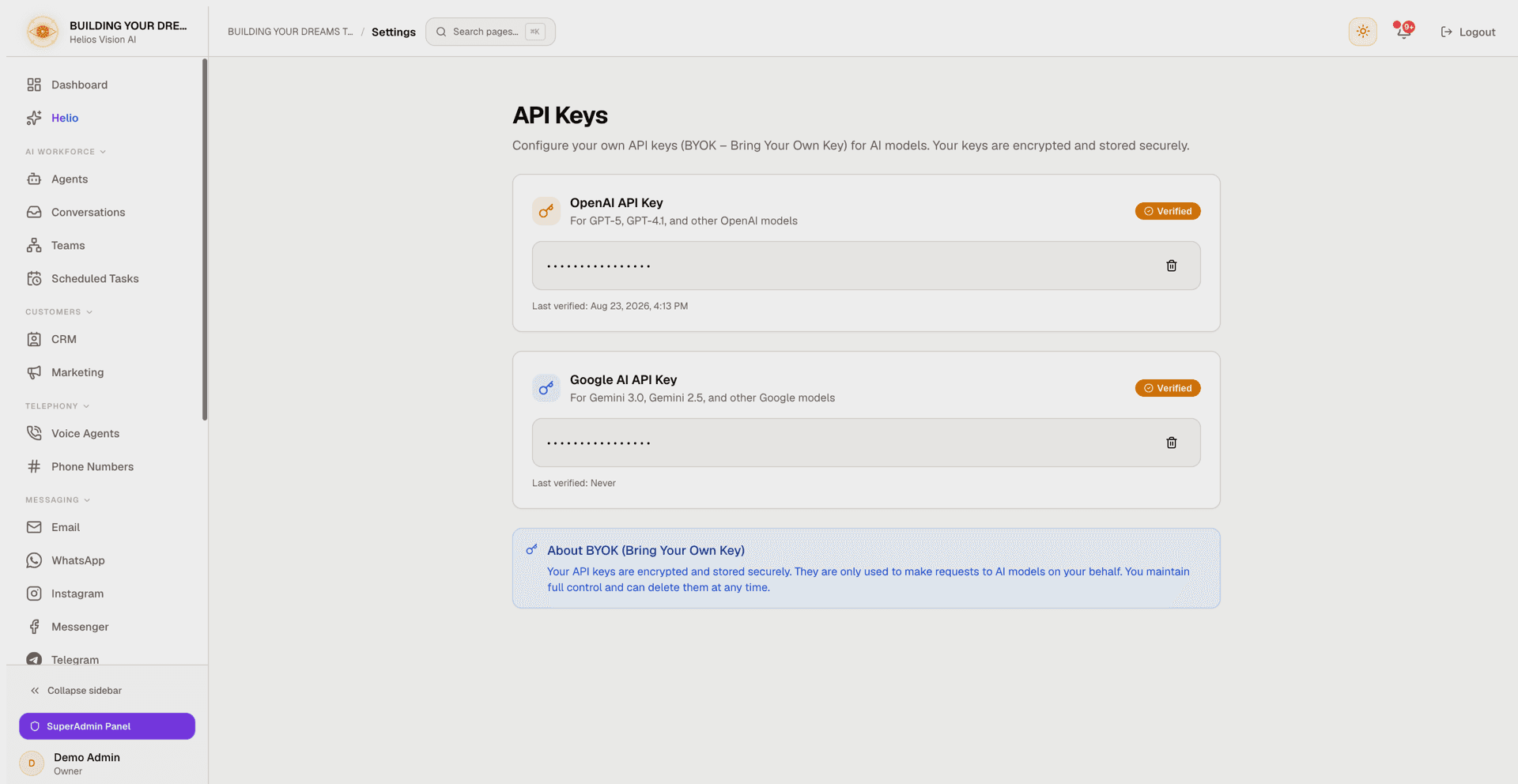
Bring your own key (BYOK): save your own OpenAI and Google AI API keys so your AI agents run on your provider accounts. Keys are verified with the provider before they are saved, stored encrypted, and shown masked. You keep full control and can delete a key at any time.
Access
Route: /app/{tenant}/settings/api-keys
This page has no sidebar entry of its own — it lives under Settings (Sidebar -> Settings). You usually land here from in-app prompts: when an AI feature needs a key that is not connected yet (for example, AI insights in Reports or in a conversation view), it links you straight to this page.
The same OpenAI and Google AI keys can also be managed from the Integrations page — the AI Engine section on the Settings page links there with Manage your API key in Integrations. Both screens read and write the same stored credentials.
Roles
- owner, admin
Prerequisites
- A verified email. Accounts still pending verification cannot save or delete an API key until they confirm their email.
- An account with the provider you want to use (OpenAI and/or Google AI), and a key generated there.
How this relates to managed AI credits
Whether you need a key here depends on the AI Engine section on the Settings page:
- Managed (paid plans) — the platform runs the AI for you on the AI credits included with your plan. You do not need to save your own key.
- Advanced: your own API key — your agents run on the keys you save here (or in Integrations). On the free plan this is the only mode: Managed is shown locked with an upgrade hint, and you bring your own key.
A BYOK workspace without a valid key cannot generate AI replies — there is no silent fallback to a platform key. A key saved on this page is the same key your agents use at runtime, and it is shared with the Integrations page, which manages the same OpenAI and Google AI credentials alongside other providers.
Save an API key
- In the provider card (OpenAI or Google AI), paste your key into the API Key field.
- Press Save & Verify.
- The key is checked live with the provider. If it is valid, it is saved and the card shows a Verified badge; if the provider rejects it, it is not saved.
| Provider | Field | Mandatory | Format | Note |
|---|---|---|---|---|
| OpenAI | API Key | Yes | sk-... | For GPT-5, GPT-4.1, and other OpenAI models. Saved encrypted. |
| Google AI | API Key | Yes | AIza... | For Gemini 3.0, Gemini 2.5, and other Google models. Saved encrypted. |
Once a key is saved, the card shows the masked key (the first 8 and last 4 characters, the rest hidden), a Verified / Unverified status badge, and a Last verified timestamp (Never if the key has not been verified yet).
Replace a key
There is one key slot per provider, and no edit field while a key is stored. To change a key, delete the current one first, then save the new one.
Delete a key
- On the stored key, press the trash icon.
- In the Delete API Key dialog, confirm with Delete (or back out with Cancel).
Deleting a key stops your agents from using that provider until you add a new one (unless your workspace runs on Managed AI credits).
Other providers
This page covers OpenAI and Google AI only. Voice and search providers live on the Integrations page:
- ElevenLabs and Deepgram — voice; they take effect once you select that provider in Voice Agents.
- Web Search and Twilio — also connected from Integrations.
Good practices
- Use a key from a dedicated project or account, separate from your test keys.
- Set spending limits and alerts in your provider's dashboard.
- Keep your provider account funded — a valid key with no funds can still be saved, but AI features may fail until you top up.
- Rotate keys periodically: delete the old one here and save the new one.
Common errors
- Please enter an API key — the field was empty when you pressed Save & Verify.
- Could not save the API key. Please try again. — the save was refused. The usual causes: the provider rejected the key (wrong, revoked, or lacking the right permission), or your account email is not verified yet. The key was not saved; fix the cause and try again.
- Could not delete the API key. Please try again. — the delete failed (for example, the account email is not verified yet). The key is still stored.
- Could not load your API keys. Please try again. — the page could not read your stored keys; reload the page.
- An unexpected error occurred. Please try again. — a transient failure; retry the action.
Screenshot