
Web Chat
Create and customize web chat widgets for your site, get the embed code, watch the channel indicators, and supervise the AI conversations.
Objective
Add an AI chat widget to your website. From the Web Chat module you create and customize one or more widgets, copy the embed snippet for your site, and hand each widget to an AI agent. The page header shows the same indicator strip as every other channel — who is waiting for you, how many conversations are open, and how much room your plan leaves. Visitor conversations are supervised in the shared inbox, where you can take over from the AI, reply, and close them.
Access
Sidebar -> Messaging -> Web Chat Routes:
- /app/{tenant}/webchat (create and manage widgets, get embed code)
- /app/{tenant}/conversations?channel=web_chat (Web Chat conversations in the unified inbox)
- /app/{tenant}/conversations/{id} (a single conversation)
The View conversations button on the Web Chat page opens the unified inbox filtered to Web Chat, and the Needs you indicator chip opens it already filtered to the conversations waiting for a human. Widget management lives on this page; the conversations themselves live in the shared inbox, not here.
Roles
- owner, admin, agent
- Deleting a conversation is restricted to owner and admin.
- Relaxing the outbound message policy (Settings) is restricted to owner and admin.
Prerequisites
- At least one active agent with the Web Chat channel enabled (configured in the Agents module). Without one, the create flow prompts you to set one up first.
- A verified email. An unverified workspace cannot create a widget.
- Your plan's web chat widget allowance. New workspaces include one widget; more require a higher plan.
Channel indicators
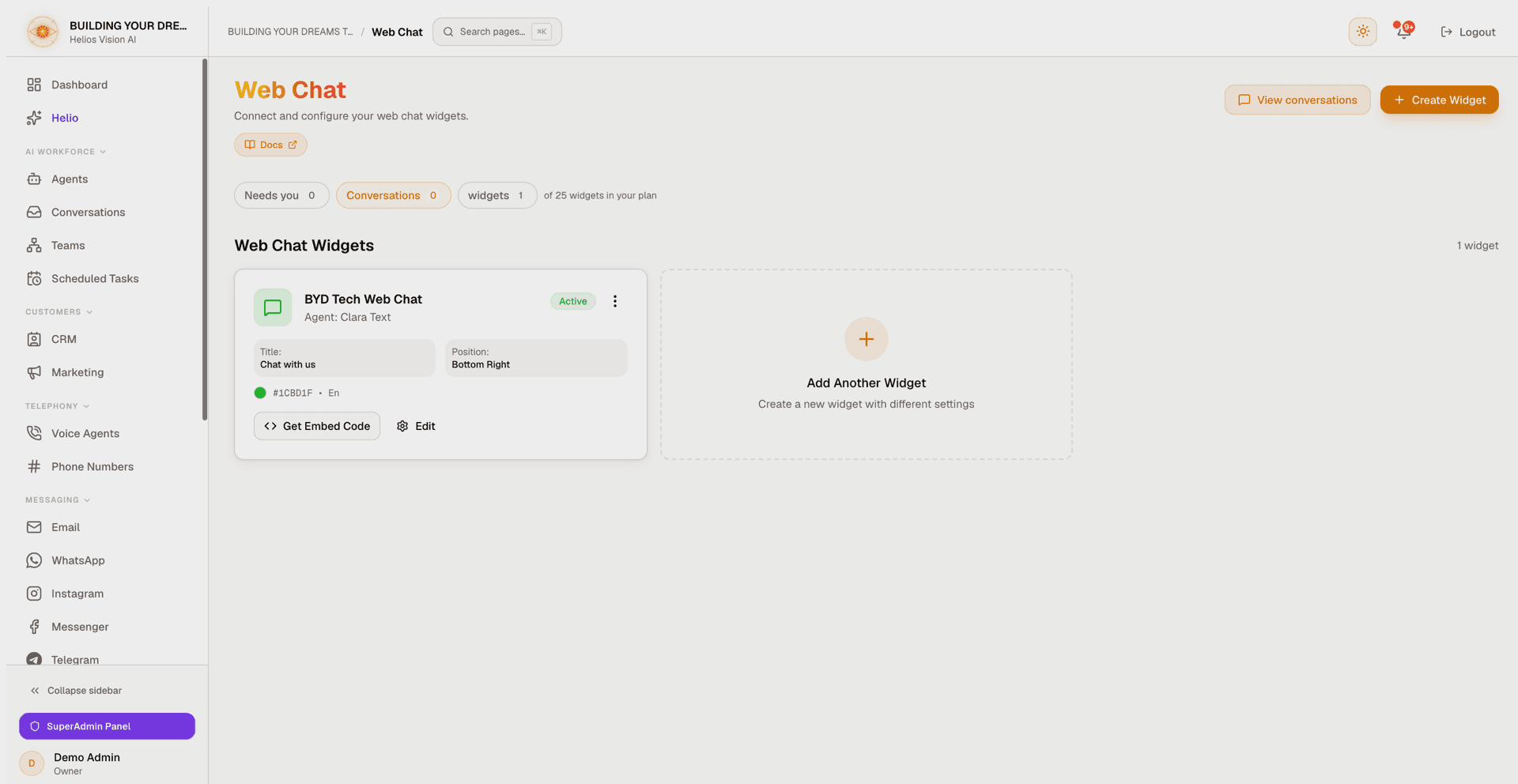
The header of the Web Chat page shows the same stat strip as the other channel modules:
| Chip | What it shows |
|---|---|
| Needs you | Open Web Chat conversations waiting for a human (escalations and attention flags). Turns amber when it is above zero. Clicking it opens the inbox filtered to exactly those conversations. |
| Conversations | Open Web Chat conversations. Clicking it opens the inbox filtered to Web Chat. |
| widgets | Active widgets, next to "of N widgets in your plan" (or "unlimited in your plan"). Turns amber when you reach the plan ceiling. |
Notes:
- The counts come from the same source and the same filters as the inbox pages the chips link to, so a chip and its destination cannot contradict each other.
- The strip is hidden when your plan does not include Web Chat, and it is also not rendered when the counts cannot be loaded — it never shows made-up zeros.
- A Web Chat conversation stays open until you close it in the inbox or the visitor starts a new conversation, so Conversations counts open threads, not lifetime traffic.
Create a widget
- On the Web Chat page, click Create Widget (or the Create Your First Widget card).
- Fill in the create modal (Create Web Chat Widget). A Live Preview at the top reflects your changes as you type.
- Click Create Widget to save.
| Field | Notes |
|---|---|
| Widget Name | Required. Internal name to identify this widget; not shown to visitors. |
| AI Agent | Required. Must be an active agent with the Web Chat channel enabled. Choose a solo agent ("Agents (answer alone)") or a Team ("Teams (can ask a specialist for help)"). |
| Language | Widget language shown to visitors: English, Spanish, Portuguese, French, or German. |
| Widget Title | Header text visitors see. Default "Chat with us". |
| Welcome Message | First message shown when the chat opens. Default "How can we help you today?". |
| Primary Color | Accent color, from presets or a custom hex value. Default #3b82f6. |
| Position | Bottom Right or Bottom Left. |
| Widget Theme | Light, Dark, or Auto. Auto follows the visitor's system preference. |
| Chat button icon | Floating button icon: Chat, Message, Support, Spark, Wave, or Helios. |
| Animate chat button | Adds a gentle bounce to attract attention. Default ON. |
| Widget Avatar | Custom logo or avatar (PNG, JPG, SVG, or WebP; max 2MB). Shown beside the agent's replies. |
| Allowed Domains | Restrict the widget to specific domains. Accepts example.com, *.example.com, and localhost:3000. Leave empty to allow any site. |
| Collect visitor name | Ask the visitor for a name before starting the chat. |
| Collect visitor email | Ask the visitor for an email before starting the chat. |
| Show branding | Display "Powered by HeliosVision". Turning it off requires the Growth, Business, or Enterprise plan. |
| Offline Message | Optional message shown when agents are unavailable. |
Notes:
- Team mode is only available when your plan includes Teams and the chosen agent is a coordinator with at least one approved specialist. Otherwise the widget answers with a solo agent.
- If a widget's linked agent later becomes inactive or loses the Web Chat channel, the editor flags it and asks you to pick an active agent before saving.
- Message bubbles carry your identity, not the platform's: the agent side shows the Widget Avatar if you uploaded one, otherwise the linked agent's initial, otherwise the widget title's initial. The visitor side shows the visitor's initial when a name was collected, otherwise a neutral figure. The Live Preview follows the same rules as the real widget.
Manage widgets
Each widget appears as a card showing its name, linked agent, an Active / Inactive badge, and a preview of its title, position, color, and language. Card actions:
- Get Embed Code — open the install snippets (see below).
- Edit — reopen the same modal titled "Edit Widget".
- The actions menu (⋮) adds Delete Widget.
When you have more than one widget, a Search box and a Sort control (Name A–Z, Name Z–A, Active first) appear above the grid.
Deleting a widget asks you to confirm. Existing conversations are preserved, but new visitors can no longer start chats with that widget.
Get the embed code
Open Get Embed Code on any widget to copy an install snippet. The modal offers three paths:
| Option | Use it when |
|---|---|
| Install with your AI coding agent | You build with Cursor, Claude Code, v0, Lovable, or similar. Copy the prompt and paste it into your agent; it wires the widget into your framework for you. |
| Basic Installation | You paste the script into your site's HTML yourself, just before the closing </body> tag. |
| With Visitor Identification | Same as Basic, plus optional fields to pre-identify visitors (name, email, and custom metadata). |
Each snippet already contains your widget's ID and always points at the production URL, so it works from any site. After pasting the snippet and deploying, the floating chat button appears on your pages.
You can also drive the widget from JavaScript:
window.HeliosChat.api.open()opens the chat.window.HeliosChat.api.close()closes the chat.window.HeliosChat.api.sendMessage('Hi')sends a message.
Plan limits and branding
- The number of widgets you can create depends on your plan. The widgets indicator chip shows your current usage against the plan limit, and reaching the limit opens an upgrade dialog instead of the create form.
- Removing "Powered by HeliosVision" branding requires the Growth, Business, or Enterprise plan. On other plans the toggle stays on.
Prologue and AI disclosure
Two optional agent settings shape how the widget opens a conversation. Both live on the agent, not on the widget, so they apply on every channel the agent answers:
- Prologue (Agents -> edit -> Prologue tab). When the linked agent has a prologue, the widget runs those scripted steps first — asking the configured questions before the AI answers freely — and hands the collected answers to the agent as context. A choice step is shown as a numbered list (the widget renders plain text, not buttons), and the visitor can answer with the number or the text of an option. A prologue step can also hand the conversation directly to your team.
- Tell customers they are chatting with an AI (Agents -> edit -> AI Config). Off by default. When on, the first reply of a conversation opens by saying it is an AI assistant and offers to bring in a person, in the visitor's language (or with your own wording); it is repeated only after a day of silence. Regardless of this setting, if a visitor asks outright whether they are talking to a person, the agent always answers honestly — that cannot be turned off.
Outbound message policy
Every autonomous AI reply passes an outbound policy check before it reaches the visitor:
- A reply containing a live credential or secret is always blocked. This rule cannot be relaxed.
- A reply that asks the visitor for credentials or account access, commits your business financially (a price, discount, refund, or waiver), or makes a legal-shaped promise (guarantee, warranty, contractual assurance) is held for human review instead of being sent.
When a reply is held, the visitor does not see it. They receive a short hand-off message instead — "Let me check this with our team. A team member will review your request and follow up with you here." — in their own language. The conversation is escalated, your active team members are notified with a link to it, and the held draft is preserved (with any secrets redacted) so a person can review it; in the inbox the hand-off bubble is labeled as a policy hold. A held message always waits for review; it is never silently dropped.
If your business genuinely needs the agent to say these things — for example, quoting prices is its job — an owner or admin can relax each reviewable rule under Settings -> Outbound message policy. The credential-blocking rule stays on for every workspace.
Conversations
Web Chat conversations are supervised in the shared inbox. Open a conversation to see the visitor's name and email (or "Anonymous Visitor" when neither was collected), the message thread, and the controls below.
| Control | What it does |
|---|---|
| AI Active / AI Disabled | Turn the agent's automatic replies on or off for this conversation. |
| Take Over | Shown when the AI asks for help ("AI Requested Assistance"). Takes over and pauses AI replies. |
| Return to AI | Hand a human-handled conversation back to the AI. |
| Close / Reopen | Change the status between Active and Closed. |
| Archive | Hide a closed conversation from the active list; it can be reopened later. |
| Delete | Permanently delete the conversation and its messages (owner and admin only). |
| Generate Insights | Produce an AI summary and sentiment analysis for the conversation. |
Notes:
- The panel refreshes automatically every few seconds; your reply appears immediately as you send it.
- A message bubble is marked RAG when the agent used your documents and SQL when it queried your data tables.
- Inbound attachments render inline: images as thumbnails, voice notes and documents as labeled chips.
- A reply held by the outbound message policy shows up as an escalated conversation; take over to answer the visitor yourself.
- Generate Insights uses AI. If your workspace relies on your own OpenAI key and it is missing or invalid, you are prompted to add or fix it under Settings -> API Keys.
- These conversations also appear in the full unified inbox alongside every other channel.
Good practices
- Set up an agent with the Web Chat channel before creating a widget, so the widget has someone to answer.
- Use Allowed Domains to keep a widget from loading on sites you do not control.
- Turn on Collect visitor email when you want a way to follow up after the chat.
- Take over from the AI when a conversation escalates, then hand it back once resolved.
- Review policy holds promptly: the visitor was told your team would follow up, and the Needs you chip counts those conversations.
- If quoting prices or discounts is your agent's job, relax the financial rule under Settings -> Outbound message policy so those replies are not held.
Common notes
- If a widget shows the "previously linked agent is inactive" warning, activate the agent (or enable its Web Chat channel) in the Agents module, then reassign it.
- Deleting a widget does not delete past conversations; it only stops new chats.
- Branding and widget-count limits are enforced by your plan; upgrade to lift them.
- If the indicator strip is missing, either your plan does not include Web Chat or the counts could not be loaded at that moment — reload the page.