Notifications
Review workspace alerts from every channel: escalations, held replies, billing and integration warnings — filter, search, and mark as read.
Objective
Keep track of everything your workspace needs to react to: conversations handed off to a human, automatic replies held for review, emails waiting for approval, billing problems, plan-limit warnings, and integration issues — all in one list you can filter, search, and mark as read, shown in your own language.
Access
Header -> bell icon -> View all Route(s): /app/{tenant}/notifications
There is no sidebar entry. Open the bell icon in the top navigation bar and click View all to reach the full Notifications page.
Roles
- owner, admin, agent, viewer
Notifications are shared across the workspace. Everyone sees the same workspace-wide alerts, plus any addressed specifically to their own account; alerts addressed to another teammate are not visible to you. Read/unread state on workspace-wide alerts is shared: when one teammate marks one as read, it is read for everyone.
Prerequisites
None. Notifications are generated automatically as your channels, agents, billing, and integrations run — there is nothing to configure on this page.
Notification bell (header)
The bell icon lives in the top navigation bar on every page.
| Element | Behavior |
|---|---|
| Unread badge | Red counter showing unread notifications; displays 9+ past nine. |
| Critical dot | Extra rose dot when an operationally critical alert is unread: voice provider out of credit / invalid key / error, integration disconnected, payment failed, resources deactivated, or the AI paused for credits (AI paused: out of credits / AI paused: daily limit reached). |
| Auto-refresh | The bell checks for new notifications every 30 seconds and briefly pulses when the unread count rises. |
| Dropdown | Shows up to 10 unread notifications, each with View and Mark read. |
| View all | Opens the full Notifications page. |
| Mark all as read | Marks the unread items currently shown in the dropdown as read. |
Notifications page
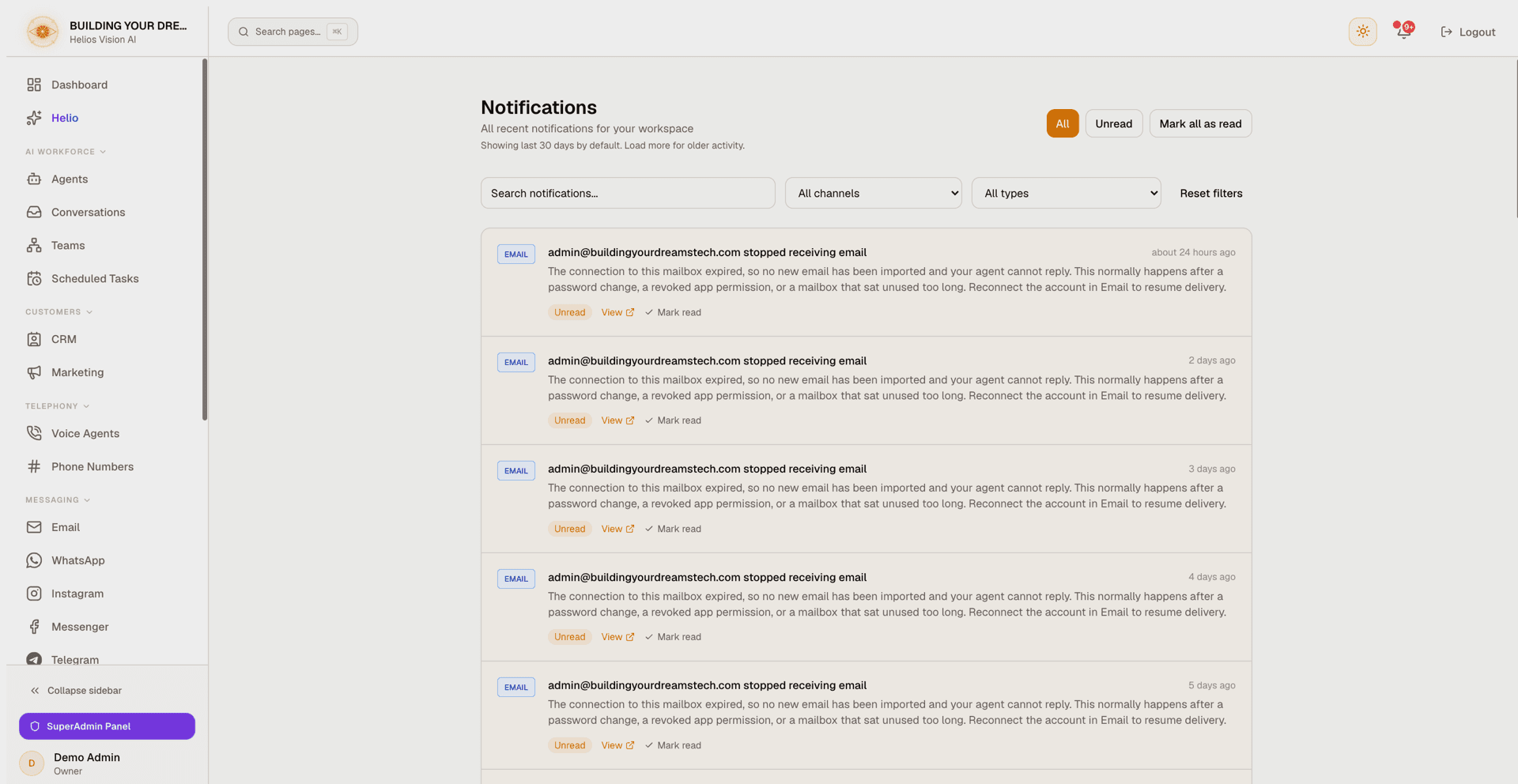
Tabs and search
| Control | What it does |
|---|---|
| All | Shows recent notifications (read and unread) within the default time window. |
| Unread | Shows every unread notification regardless of age. |
| Search | Filters by text in the title or message (updates as you type). |
| Mark all as read | Appears when unread items are present; marks the notifications currently loaded on the page. |
Filters
| Filter | Options |
|---|---|
| Module | All channels, WhatsApp, Web Chat, Email, Tasks, Integrations, Billing, System |
| Type | All types, WhatsApp escalation, Web Chat escalation, Email pending review, Payment failed, Subscription downgraded, Plan limit warning, Resources deactivated |
| Reset filters | Clears the search text and both filters back to their defaults. |
Notifications also arrive from origins outside these lists — Instagram, Messenger, Telegram, TikTok, and other modules (see "Where notifications come from"). Those rows appear under All channels / All types and can be found with search, but the two dropdowns do not offer them as options yet.
Filterable notification types
| Type | Meaning |
|---|---|
| WhatsApp escalation | A WhatsApp conversation was handed off to a human. The row shows the contact, escalation reason, who took it over, and who else has seen it. |
| Web Chat escalation | A web chat conversation was handed off to a human. |
| Email pending review | An AI-drafted email reply is waiting for approval before it is sent. |
| Payment failed | A subscription payment could not be processed. |
| Subscription downgraded | The workspace plan was downgraded. |
| Plan limit warning | The workspace is approaching or has exceeded a plan limit. |
| Resources deactivated | Resources were deactivated to fit the current plan's limits. |
Notifications in your language
Notifications respect the app language each person chose in their settings. The most common alerts — human-handoff escalations from any channel, WhatsApp / Messenger / Instagram connection problems, AI credit alerts, and a rejected OpenAI key — are displayed in English or Spanish accordingly, and every teammate sees them in their own language. Alert types without a translation keep their original text (usually English); free text inside an alert, such as the reason an AI agent gave for escalating, is shown as written.
Reading a notification
Each row shows a colored module badge, a title, the relative time, the message, and an Unread or Read badge. When a notification links to a related record, a View link opens it (for example the WhatsApp conversation, phone numbers, or integration settings) and marks the item as read. Use Mark read to dismiss a single item without leaving the page.
Held replies
When your outbound review policy stops an automatic reply instead of sending it, the escalation notification carries the full withheld draft in a highlighted quote labeled Reply held for review. The customer has NOT received this text: — so a person can always read exactly what was stopped. On channels that only accept replies for a limited time, the quote also states when the reply window closes, or that it has already closed and a direct reply is no longer possible.
Time window and loading more
By default the All tab shows recent activity limited to your plan's data-retention window, up to 30 days; the page notes how many days are shown. Use Load more to page back through older notifications. The Unread tab is not limited by this window.
Where notifications come from
| Badge | Typical origin |
|---|---|
| WhatsApp, Web Chat, Instagram, Messenger, Telegram, TikTok | A conversation on that channel was escalated to a human — including replies held for review. |
| An AI email waiting for review; email account connection problems. | |
| Billing | Payment failed, subscription downgraded, plan-limit warnings, resources deactivated. |
| System | Workspace-wide platform notices, including AI credit alerts. |
| Integrations | A connected integration was disconnected or its access expired. |
| Documents | The result of processing an uploaded document. |
| Support | A reply from the Helios support team. |
| Phone Numbers | Voice and phone-number usage alerts. |
| Agents | A tool connected to one of your agents failed during a conversation. |
Ask Helio
You can also manage notifications by chatting with Helio: ask for a look at recent alerts, mark a single one as read, or clear everything unread — optionally scoped to one module. Clearing everything always asks you to confirm on a card that shows the exact number of alerts it will mark as read and warns you when critical alerts are included.
Good practices
- Check the Unread tab daily so escalations and pending email reviews do not sit unanswered.
- Watch for the rose critical dot on the bell — it flags issues that are degrading service right now, including the AI pausing for lack of credits.
- Open held-reply notifications promptly: some channels only accept replies for a limited time, and the notification tells you whether the window is still open.
- Use the Module and Type filters together to isolate one channel or one kind of alert.
- After Load more, run Mark all as read again to clear the newly loaded older items.
Common errors
- Read/unread state on workspace-wide alerts is shared; a notification marked read by anyone shows as read for the whole team.
- Mark all as read only affects the notifications currently loaded on the page, not those still hidden behind Load more.
- How far back the default All view reaches depends on your plan's data retention (capped at 30 days). Switch to Unread to see older items that are still unread.
- Search matches the stored text of each notification, which is usually English — a row displayed in Spanish is still found by its English wording. When search misses, filter by module or type instead.
- Escalations from Instagram, Messenger, Telegram, or TikTok cannot be isolated with the Module filter yet; use search or the channel's own page.